




















































































































































ERP implementation often fails due to project scope creep, poor data quality, and poor change management, rather than the software itself. For ERP system manufacturing, complexity increases with the introduction of bills of materials, routing, MES links, and multi-shift operations; a hasty ERP rollout can paralyze production. This article shows how to implement ERP systems step by step, the pitfalls that exist, and the key performance indicators (KPIs) to consider (e.g., inventory accuracy, on-time order fulfillment, closing time). Example: early migration of product master data, validation of bill of materials versions, then pilot implementation on one production line and ERP go-live.
5 Key Facts About ERP Implementation in Manufacturing
- ERP implementation in manufacturing involves six stages: research, design, configuration, data migration, testing, and launch.
- Cloud-based ERP systems (SAP, Oracle, NetSuite, Microsoft Dynamics 365) are currently the standard for mid-sized manufacturers; on-premises systems are used only for highly customized solutions or to comply with regulatory requirements.
- The main causes of ERP system failure are project scope creep, poor data quality, and insufficient change management, not the software itself.
- Success metrics for ERP in manufacturing and ERP go-live include inventory accuracy, production order cycle time, on-time delivery rate, and financial close time.
- Most ERP projects for mid-sized manufacturers take 6 to 18 months and cost between $150,000 and $2 million or more, depending on the project scope, system, and level of customization.
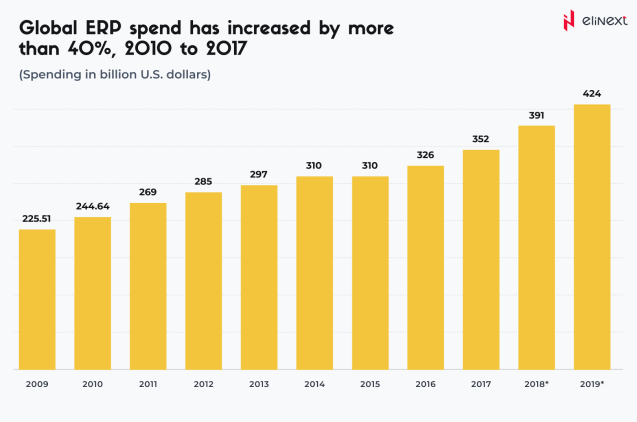
What is a Manufacturing ERP System?
ERP implementation means deploying an integrated platform that manages production, inventory, purchasing, and finance. A manufacturing ERP system includes modules for production planning, MRP (material requirements planning), bill of materials (BOM) management, shop floor control, quality management, inventory management, purchasing, and finance. Unlike an MES (manufacturing execution system), which is responsible for execution, a manufacturing ERP system operates at the planning level; the two systems integrate but do not replace each other. Specialized ERP best practices are required for bill of materials versioning, production routing, shift management, and traceability.
Focus on ERP implementation stages, leverage cloud ERP manufacturing, and track ERP ROI manufacturing

How to Prepare for an ERP System Implementation
1. Define Project Scope, Objectives, and Success Metrics
ERP implementation for manufacturing begins with defining the modules within its scope (finance, production, inventory, purchasing, HR). Most manufacturers prefer a phased approach to finance and inventory first. Define success metrics before launch: inventory accuracy, order fulfillment rate, and transaction close time. Assign a lead to ensure that ERP implementation for manufacturing remains a priority for senior management.
2. Map and Standardize Current Business Processes
To master how to implement ERP, start with business process mapping. Document the “as is” (current processes), even if they are inefficient. Developing the “to be” (future processes) for the ERP often requires decisions not only from IT specialists but also from the business. A gap analysis reveals what the ERP system does out of the box, what needs to be customized, and what needs to be changed. Remember: ERP implementation guide rule is that ERP doesn’t automate chaos; it scales it.
3. Build the Right Implementation Team
ERP implementation success depends on the right team: an internal project manager, an ERP consultant (vendor/system integrator), functional managers (finance, operations, IT), and 5-10 superusers. A change manager is crucial and implementation depends on them. Most vendors use a system integrator (SI) rather than direct deployment. Key staff should dedicate 20-40% of their time during peak periods for ERP best practices.

ERP implementation often fail when companies underestimate the complexity of aligning business processes with technology. Our custom ERP solutions and structured ERP implementation steps help manufacturers avoid pitfalls by focusing on process mapping, data quality, and change management, ensuring a smoother transition and sustainable results.

ERP Implementation Steps: A Practical Guide
Step 1: Configure the System to Your Processes — Not the Other Way Around
ERP selection manufacturing should prioritize configuration (system parameters, workflows) over customization (code changes). Customization increases upgrade and support costs. For manufacturing ERP systems, workflow automation is part of the configuration process. Follow the configuration process: Finance → Purchasing → Inventory → Production → Quality for a manufacturing ERP system.
Step 2: Clean and Migrate Your Data Before Go-Live
Cloud ERP manufacturing projects for manufacturing are successful when data migration is a priority. Migrate master data (products, bills of materials, suppliers, customers), open transactions, and, if necessary, historical data. The golden rule: cleanse data in the source system, not in the ERP. Assign data management roles. Use your own ERP import templates, middleware (Dell Boomi, MuleSoft), or custom ETL processes. Avoid delaying data migration until the last two weeks.
Step 3: Integrate ERP with Shop Floor and External Systems
ERP implementation requires both downstream integration (ERP ↔ MES via ISA-95, barcodes/RFID for shop floor data) and outbound integration (EDI with suppliers/customers, CRM, e-commerce). Integrating systems with customers and suppliers is a key step. For more than three integrations, middleware (Dell Boomi, MuleSoft, Azure Integration Services) is more cost-effective than point integration.
If your integration environment is complex, our ERP integration specialists can determine its scope during the evaluation phase.
Step 4: Train Users Before Go-Live, Not During
ERP for manufacturing is successful when training is a separate step. Use role-based training as cashiers don’t need production planning. The superuser model creates internal champions, reducing the burden on the help desk. User acceptance testing (UAT) uses real-world scenarios, not demo data. Conduct change management simultaneously: explaining the “why” is more important than simply training the “how.”
Step 5: Go-Live and the First 90 Days (Hypercare)
ERP system manufacturing go-live requires careful cutover planning and a weekend launch is standard practice. A parallel launch reduces risks but doubles the workload. Hypercare teams provide extended support for 30–60 days. Monitor key performance indicators (KPIs) against the baseline established during preparation. Common challenges during the first 90 days include poor performance, lack of configuration options for non-standard situations, and user resistance. Intelligent manufacturing solutions ensure a smooth transition.
How to Use ERP Like a Pro: Post-Go-Live Best Practices
ERP for manufacturing delivers value post-launch through a disciplined approach to data, KPI tracking, and continuous improvement. Assign data ownership, conduct inventory, synchronize changes to material specifications, and conduct quarterly data audits. Analyze underutilized modules and implement new features from supplier updates to ensure ongoing ROI.
1. Enforce Data Discipline as an Ongoing Standard
ERP implementation requires constant data discipline. Assign data owners for each master data area. Use cycle counting to ensure inventory accuracy. Synchronize bill of materials versions with design changes. Conduct quarterly reviews of product and supplier master data to maintain data integrity and trust in the system.
2. Track the Right ERP KPIs for Manufacturing
Key KPIs for an ERP system in manufacturing include inventory accuracy (target ≥98%), on-time delivery (OTD), production order cycle time, financial close time (≤5 business days), and purchase order cycle time. Use analytics to set goals and monitor progress for continuous improvement.
3. Run a Continuous Improvement Cycle on the System
Quarterly ERP system health reviews identify underutilized modules and processes that are still running outside the system. Monitor the vendor’s feature development plans and most cloud ERP systems release 2-4 major updates per year. Once they stabilize, consider using advanced modules such as APS, demand forecasting, and deeper integration with MES.
Common ERP Implementation Mistakes to Avoid
Avoiding common mistakes is critical to the success of an ERP system. Key mistakes include launching the system with “dirty” data, underestimating change management, over-customization, choosing an ERP system based on demos, lack of management support, and viewing system launch as the end goal.
1. Going live with dirty data
“Dirty” data in a legacy system leads to “dirty” data in the ERP system, causing users to mistrust it and return to Excel. Solution: Audit and cleanse the data 3-4 months before system launch.
2. Underestimating change management
A technical project will fail if people are not prepared to change their habits. Change management is a 6-month process of communication and engagement, not a one-day training session. 3. Over-customizing the system
Every customization increases maintenance costs and upgrade risks. Rule: first, adapt processes to ERP standards; customize only when absolutely necessary.
4. Selecting ERP based on demos, not requirements
A beautiful demo doesn’t guarantee compliance with your production processes. Before selecting a system, conduct a formal request for proposals (RFP) with specific, pre-prepared scenarios.
5. No executive sponsor with real authority
ERP impacts all departments. Without a sponsoring leader with decision-making authority, projects get bogged down in cross-functional conflicts. Sponsor ≠ presentation title.
6. Treating go-live as the finish line
Launch is just the beginning. Without constant monitoring, KPI tracking, and continuous improvement, a project stabilizes at 40-50% of its potential. ROI is achieved in the first 12-24 months after launch.
Prioritize ERP implementation best practices.
Key Takeaways
- A manufacturing ERP system integrates production planning, bill of materials management, inventory control, purchasing, and finance into a single platform, replacing disparate systems and manual reconciliations.
- Cloud ERP systems (SAP S/4HANA Cloud, Oracle NetSuite, Microsoft Dynamics 365) are the standard for mid-sized manufacturers; on-premises systems remain relevant for complex regulatory requirements or highly customized environments.
- ERP implementation involves five phases: configuration, data migration, integration, training, and go-live—each with its own distinct outcomes and causes of failure.
- The primary causes of ERP system failures are poor data quality, insufficient change management, and project scalability, not the software itself.
- Success after go-live requires data management, proper KPI dashboarding, and a quarterly improvement cycle to activate underutilized ERP features.
Conclusion
Manufacturers implementing ERP systems in 2026 achieve an average ROI of 52%, with most paying off their investment within 16 months and reporting a 15-30% reduction in inventory costs, a 23% reduction in operating expenses, and a 20-40% improvement in on-time delivery.
78.6% of new projects utilize cloud-based ERP systems and predictive maintenance software development services, enabling companies to maximize the ROI of ERP systems in terms of production and operational efficiency. Hyper-support and strong leadership ensure an 85% project success rate, and phased implementation reduces critical issues by 62%.
ERP Implementation: Terms Explained
Enterprise Resource Planning (ERP)
A software platform that integrates core business processes such as finance, manufacturing, inventory, purchasing, and HR into a single system to improve data visibility and control.
Business Process Mapping
The practice of documenting current workflows (“as is”) and designing future workflows (“to be”) to align business operations with ERP system requirements.
Data Migration
The process of transferring data (master, transactional, and historical) from legacy systems to a new ERP, ensuring accuracy and completeness.
System Integration
Connecting ERP to other systems (MES, WMS, CRM, e-commerce) to ensure seamless data flow and process automation across the enterprise.
Change Management
A structured approach to preparing, supporting, and assisting individuals and teams in implementing new processes and technologies during ERP implementation.
User Acceptance Testing (UAT)
The phase in which end users test the ERP system using real-world scenarios to ensure it meets business requirements before going live.
Key Performance Indicators (KPIs)
Quantitative metrics (e.g., inventory accuracy, on-time delivery) used to evaluate the success of the ERP system implementation and ongoing operational performance.
Go-Live Deployment
The formal launch of the ERP system, the transition from legacy systems to the new platform, often with the support of a hyper-support team.
FAQ
-
ERP in manufacturing is an integrated software system that manages production, inventory, purchasing, and finance on a single platform. Manufacturers use ERP to automate processes, improve data accuracy, and gain real-time insights. A manufacturer can track raw materials, plan production, and manage costs from a single dashboard.
-
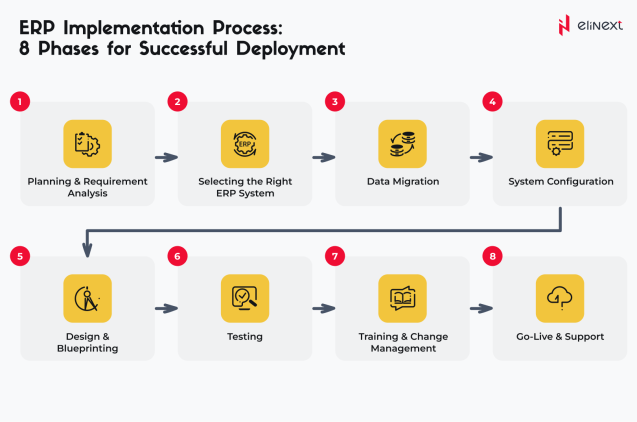
The stages of ERP implementation include defining the project scope, mapping the business processes, building the team, configuring the system, data migration, integrating with other systems, user training, and launching with support. Each stage is critical to the success of ERP implementation in manufacturing and must adhere to risk mitigation best practices.
-
ERP implementations fail due to scope creep, poor data quality, and inadequate change management. Companies often underestimate the need for process mapping and user training. Launching with poor data or a lack of management support can lead to user distrust and project delays.
-
Choosing the optimal ERP system for manufacturing depends on the company’s size, complexity, and industry needs. Leading options include SAP S/4HANA Cloud, Oracle NetSuite, Microsoft Dynamics 365, Epicor, and Infor CloudSuite. Manufacturers should select an ERP system based on its suitability for production planning, bill of materials management, and integration with MES systems.
-
Implementing an ERP system for manufacturers typically takes between 6 and 18 months, depending on the project scale, system complexity, and level of customization. For example, a mid-sized manufacturer implementing a cloud ERP system with phased module rollout can complete the project in 12 months, while highly customized projects take longer.
-
The cost of implementing an ERP system for manufacturing ranges from $150,000 to $2 million or more, depending on the system chosen, the number of users, and customization. This includes software licenses, consulting, data migration, training, and post-launch support. Cloud ERP systems often offer lower initial costs than on-premises solutions.
-
The success of an ERP implementation is measured by key performance indicators (KPIs), such as inventory accuracy (≥98%), on-time delivery percentage, production order fulfillment time, and financial close time (≤5 days). Achieving ROI within 16-24 months and high user adoption are also key success indicators.
-
A cloud ERP system is hosted remotely and accessible over the internet, offering lower initial costs, faster deployment, and easier upgrades. An on-premises ERP system is installed locally, providing greater control but higher maintenance, upgrade, and ROI costs.