Client
We got an inquiry about developing a mobile inventory app for warehouse clerks from a Swiss family business. The company has been operating for almost a century. They claim that thanks to their many years of experience, they know the needs of our customers and work together to develop tailor-made solutions that help them advance their everyday business. Elinext is proud to deliver our custom software development services to help businesses like this one.
Project Description
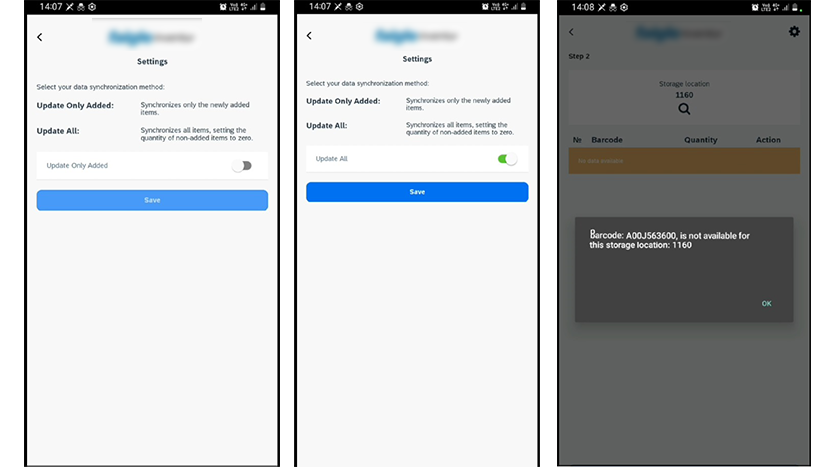
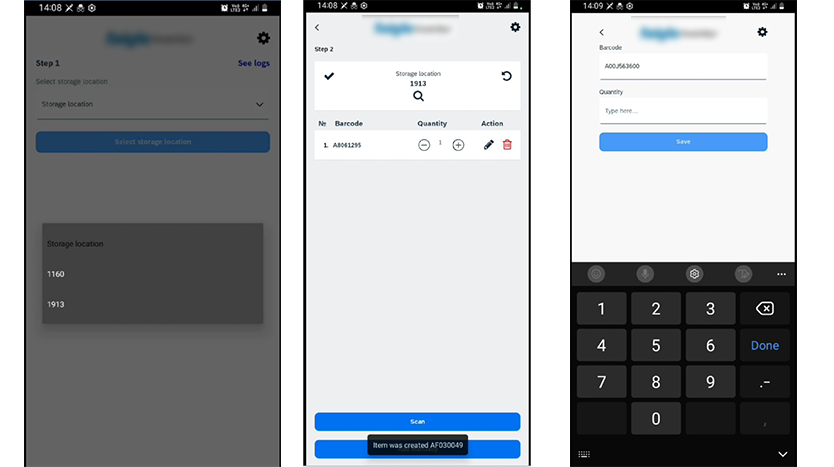
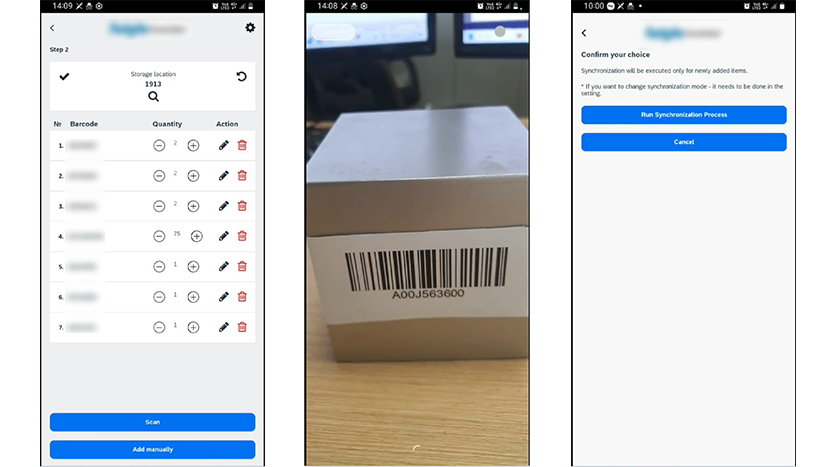
Our customer needed a mobile inventory app that would help warehouse clerks manage their product inventory. The operating process is fairly simple: each time a technician scans a product barcode, the app collects data on the product number and quantity.
The important part of such mobile app development solutions is to avoid errors (i.e. double scans, etc.) and enable real-time updates. The backend application should analyze data to ensure inventory accuracy by comparing scanned quantities with expected stock levels.
With 50 technicians each managing 100-200 products, the system will handle data for approximately 5,000 to 10,000 products per inventory cycle. Given that inventories are conducted twice a year, the system will process data for 100 inventory sessions annually.
Challenges
Based on the information provided, client expected SAP inventory manager mobile app that would include:
Increased Efficiency:
- Streamlining the inventory process with a user-friendly app, reducing manual data entry errors and increasing overall inventory accuracy.
- Ensuring real-time synchronization with SAP S4
- Minimizing delays in inventory updates.
Cost Reduction:
- Lowering labour costs associated with the inventory process due to reduced time requirements.
- Reducing the need for additional temporary staff during inventory periods.
Enhanced Data Management:
- Providing a centralized system for inventory management, making it easier to track and maintain stock levels.
- Allowing warehouse clerks to efficiently manage and confirm inventories.
Improved UX:
- Enhancing the user experience for technicians with a seamless, intuitive app.
- Increasing the productivity and satisfaction of warehouse clerks with a robust backend system.
Increased Inventory Accuracy:
- Reducing discrepancies in stock levels through accurate and efficient scanning and data entry.
- Ensuring that inventory records in SAP S4 are up-to-date and reliable.
With that scope of work in mind, we started the process of working on the mobile app for inventory management and running on SAP BTP.
Process
The Waterfall methodology was chosen for this project due to its structured and sequential approach, which ensures thorough documentation and clear milestones at each stage of development. This methodology is particularly effective for projects with well-defined requirements and deliverables, allowing for meticulous planning and execution. By following a linear progression, the team could systematically address each phase, from initial setup and learning to feature implementation, testing, and final deployment, ensuring a high-quality and reliable solution.
We can distinguish five stages of the inventory mobile app development:
Stage 1: Initial Setup and Learning
- Go through the official training from SAP Build Apps.
- Continuing working on a test app on SAP BTP – completing steps from learning videos and studying logic flows.
- Investigating basic principles of SAP BTP and playing around with existing APIs.
Stage 2: Initial Development and Integration
- Starting and continuing working on a test project for integrating S/4HANA with CRUD APIs using BTP Destinations.
- Creating UI app with product count functionality and investigating BTP Destinations for integration with the UI client.
- Looking deeply into existing BTP Destination and OData resources.
- Working on integration between S/4HANA with CRUD APIs and various BTP destinations, preparing for meetings and demos.
Stage 3: Main Development Stage and Enhancements
- Adding translations for the settings page and refactoring common components.
- Implemented a mechanism for selecting languages, including a UI selector.
- Adding mechanisms for clearing items from incorrect local storage and integrating with current logic.
- Developing a storage selection mechanism and adding an initial page for process storage selection.
- Working on creating a build of the app for mobile use, focusing on Android and iOS platforms.
- Developing a product simulation using real barcodes from the database.
- Adding a new item form and enhancing the app’s logic capabilities with for loops.
- Implementing and refining the barcode quantity adjustment mechanism.
- Integrating a new logo into the UI for consistent styling.
Stage 4: Testing and Bug Fixing
- Conducting extensive testing of the entire app, identifying and fixing bugs to ensure stability and performance.
- Fixing bug issues revealed after testing the whole app.
- Preparing the app and ensuring readiness for presentations.
Stage 5: Demos and Refinement
- Preparing detailed demos of progress.
- Adjusting and refining the storage selection process to ensure smooth operation.
- Preparing the stable version of the mobile app for demonstration purposes.
Solution
The solution involved developing an inventory mobile app to streamline the inventory process for technicians.
This included adding translation features, creating mechanisms for language selection, and implementing a barcode scanning system that allows technicians to scan products efficiently without pressing buttons.
The app also supports manual product entry, automatic saving of scanned items, and the ability to reset and transmit inventory data to SAP S4 for further processing by warehouse clerks. Extensive testing and bug fixing were conducted to ensure stability, and the app was prepared for both iOS and Android platforms.
Additionally, backend integration with S/4HANA using CRUD APIs was developed, and a mechanism for storage selection was implemented to enhance user flexibility. The solution also involved preparing detailed demos and refining the app based on feedback, ensuring a robust and user-friendly inventory management system.
The next steps for the solution, besides app maintenance and support services:
- Adding a Search bar
- Language support for each separate page (depending on the value in the language selector on the settings page)
- Adding a history setting with a list that will show the number after the update
- Adding UX features that are worth adding for ease of use
- Testing for different mobile devices to make sure everything works as expected.
- Customer testing
- Delivering the app to the actual users
Results
Our developers delivered a mobile inventory app after a thorough learning of the ins and outs of SAP BTP and SAP Build APPs platforms. The app has a user-friendly interface that is supported by both iOS and Android phones. The mobile app required meticulous design and testing, especially for features like barcode scanning and manual product entry, and our developers delivered on time and within the allocated budget.
The inventory mobile app is integrated with SAP S/4HANA using CRUD APIs posed significant challenges, particularly in ensuring seamless communication between the app and the backend systems. There are several refinements the system will pass in the near future.
Its safe to say the customer is satisfied with Elinext’s involvement in the project and will share future endeavours with us as a software development partner.
Related Cases