


.NET MAUI vs Xamarin are both Microsoft cross-platform frameworks that let development teams build native mobile and desktop apps from a single codebase. They are built on different architectural foundations, and that gap matters if you’re deciding which one to use.
Xamarin has been the go-to choice for cross-platform .NET development since Microsoft acquired it in 2016. .NET MAUI (Multi-platform App UI) is its official successor, released in 2022 as part of .NET 6. Microsoft ended mainstream support for Xamarin in May 2024, which means the decision isn’t really “which is better” anymore. It’s “when and how do we move to MAUI?”
That said, if you’re still running Xamarin in production or evaluating both frameworks for a legacy migration project, the full comparison Xamarin vs .NET MAUI still matters. Let’s get into it.
What is .NET MAUI?
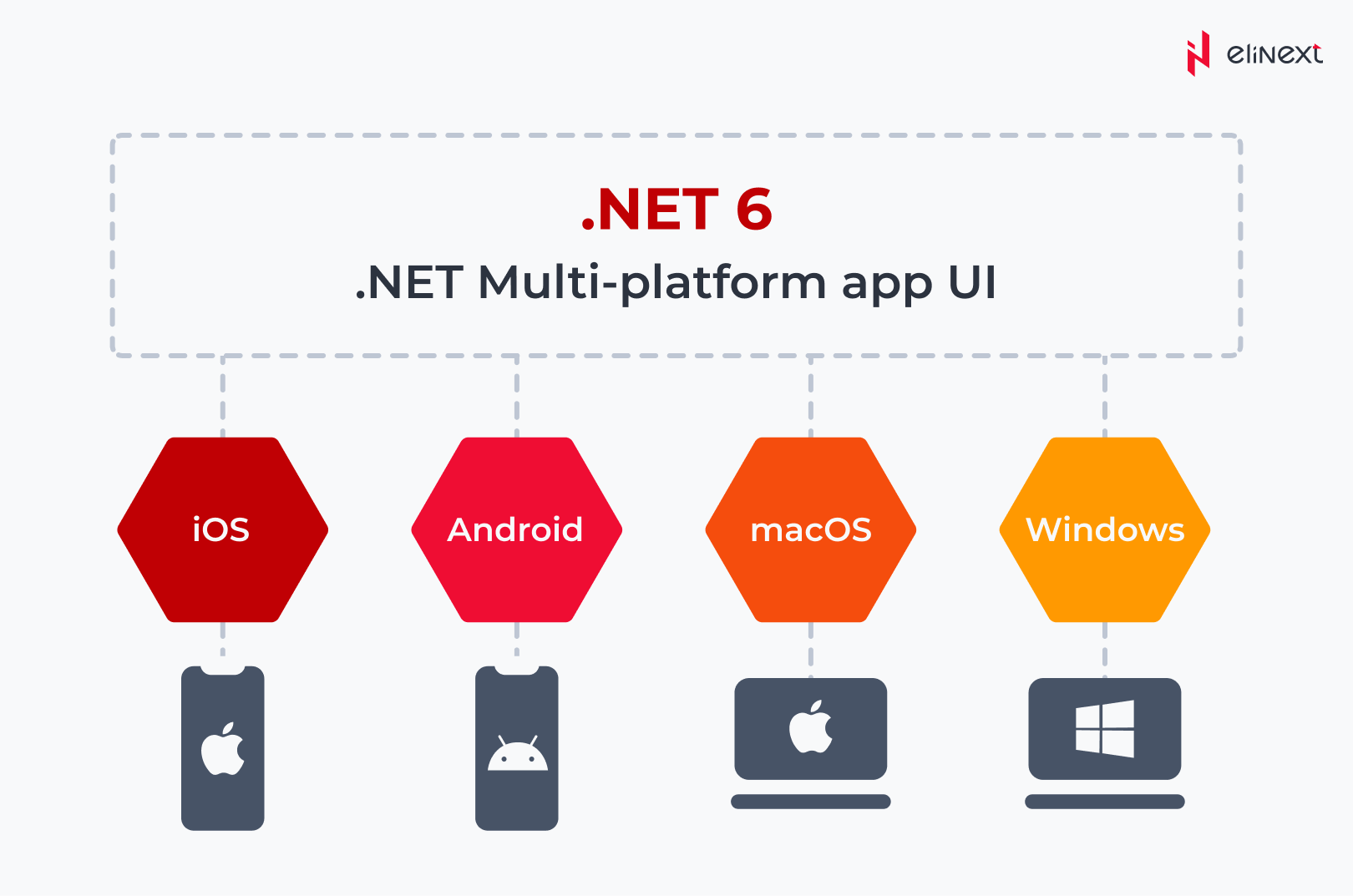
.NET MAUI, short for Multi-platform App UI, is Microsoft’s cross-platform framework for building native mobile and desktop apps using C# and XAML. One codebase, four targets: Android, iOS, macOS, and Windows.
It ships as part of the unified .NET platform (starting with .NET 6), which means no more separate Xamarin.Android or Xamarin.iOS projects. You write the shared logic once, and MAUI handles the platform-specific rendering under the hood through a single project structure. Think of it as Xamarin’s grown-up replacement: same idea, cleaner architecture, better tooling, and actually maintained.
What are the Key Features of .NET MAUI?
MAUI isn’t just a rebranded Xamarin. No, Microsoft completely reworked the foundation, how .NET MAUI vs Xamarin are intertwined, how platform APIs are accessed, and how the project itself is organized. Here’s what actually defines the framework from a development standpoint.
-
XAML-based UI Design
MAUI uses XAML – an XML-based markup language – to define UI layouts separately from business logic. You describe what the screen looks like in XAML, and C# handles what it does. This separation keeps UI code maintainable, especially on larger teams where designers and developers work in parallel.
-
MVVM Architecture Support
Model-View-ViewModel is baked into MAUI’s design. The framework includes built-in data binding and the ICommand interface, so your UI stays cleanly decoupled from application logic. Changes in the model propagate to the view automatically; no manual wiring is required. For enterprise apps, this matters a lot.
-
.NET Ecosystem Integration
Because MAUI runs on unified .NET, you get direct access to the full ecosystem: NuGet packages, Entity Framework, gRPC, Blazor hybrid components, and more. No compatibility shims, no platform-specific workarounds for common libraries. If it runs on .NET, it runs in MAUI, and vice versa. Any team working with a .NET development services partner will find the transition to MAUI’s ecosystem largely frictionless.
-
Dependency Injection
MAUI has a built-in DI container, the same one used in ASP.NET Core. Services, view models, and platform implementations are registered at startup and resolved where needed. This makes unit testing straightforward and keeps your architecture consistent across mobile and desktop targets.
-
Native User Interfaces
MAUI doesn’t render UI through a web layer or a custom canvas. Controls map to actual native platform controls. A button on Android is an Android button; on iOS, it’s a UIButton. The result is that apps look, feel, and perform like platform-native apps, because at the rendering level, they are.
What is Xamarin?
Xamarin is Microsoft’s original cross-platform mobile framework — C# and .NET, targeting Android and iOS from a shared codebase. It launched as an independent product in 2011, Microsoft acquired it in 2016, and it became the default choice for .NET mobile development for nearly a decade.
The core idea: write your business logic once in C#, then either share UI through Xamarin.Forms or build platform-specific UI layers with Xamarin.Android and Xamarin.iOS directly. The framework compiled down to native code on each platform, so performance wasn’t a compromise, at least not in theory.
Microsoft ended mainstream Xamarin support in May 2024. It still works, but it’s no longer receiving updates, security patches, or new features.
What are the Key Features of Xamarin?
Xamarin had a solid feature set for its time. And honestly, a lot of what made it appealing is still present in MAUI, just rebuilt. Here’s what defined Xamarin as a framework and why teams stuck with it for so long.
-
Modern IDE
Xamarin came with its own IDE: Xamarin Studio, later replaced by Visual Studio for Mac. Developers got code completion, a visual designer, device simulators, and debugging tools in one place. It wasn’t perfect, but it gave .NET developers a familiar environment without switching to Android Studio or Xcode for every platform-specific task.
-
Xamarin apps use the.NET BCL
Xamarin apps ran on the .NET Base Class Library, meaning standard .NET APIs (collections, file I/O, networking, cryptography) worked exactly as expected. Teams could reuse existing .NET code and libraries without rewriting platform-specific versions, which significantly reduced development time on projects with complex backend logic.
-
Integration with Visual Studio
Full Visual Studio integration was one of Xamarin’s biggest selling points for enterprise teams. Project management, source control, debugging, and profiling all lived inside the same IDE the team already used for backend work. No context switching, no separate toolchain. Just a mobile project alongside everything else in the solution.
-
Native Multi-Platform Support
Xamarin compiled C# down to native ARM binaries on iOS and native bytecode on Android. This meant apps accessed real platform APIs directly, not through a compatibility bridge. Performance and platform behavior were close to what you’d get writing in Swift or Kotlin, which is why teams cross-platform app development company chose it over hybrid alternatives like Cordova.
-
Azure Connectivity
Xamarin had tight integration with Azure Mobile Apps and other Azure services. Authentication, push notifications, offline data sync, and cloud storage connected through official SDKs with minimal configuration. For teams already in the Microsoft ecosystem, this made cloud-connected mobile apps straightforward to build and maintain.
-
Complete Binding
Xamarin provided binding libraries for native Android and iOS SDKs, meaning third-party platform libraries like camera SDKs, payment processors, and analytics tools could be wrapped and called from C# without dropping into Java or Objective-C. It wasn’t always frictionless, but it gave teams access to the full native SDK surface from managed code.
Still running Xamarin in production?
Let’s talk migration before the end-of-life deadline catches you off guard.
Drop Us A Line
Core Differences Between .NET MAUI VS Xamarin
Same origin, different architecture. Here’s where .NET MAUI vs Xamarin actually diverge, and why those differences affect real project decisions.
-
Development Environment
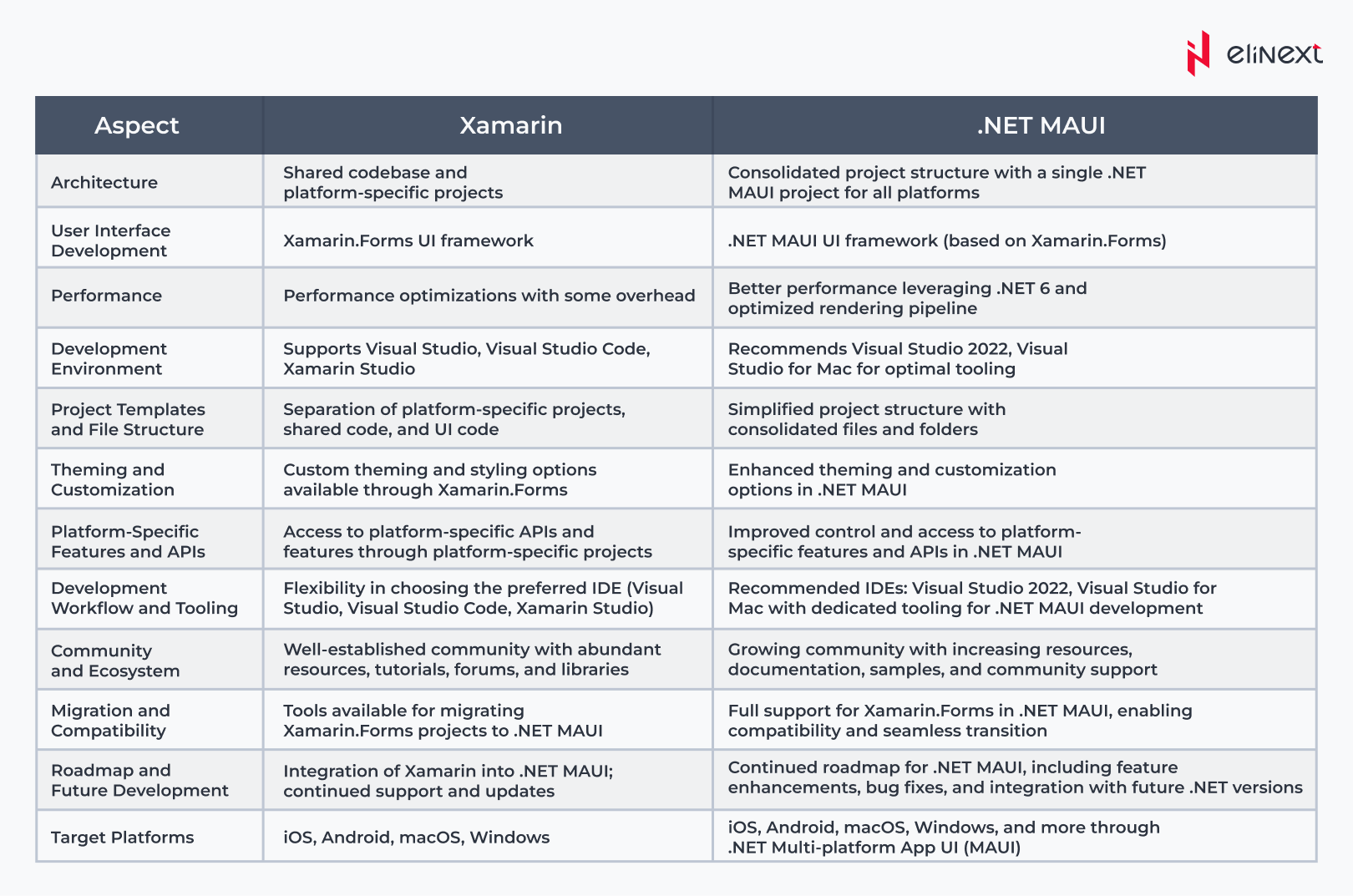
Xamarin relied on Visual Studio with platform-specific workloads and Xamarin Studio on Mac. MAUI consolidates everything into Visual Studio 2022 and Visual Studio Code with the MAUI extension. Hot Reload works properly now, the designer is more stable, and you spend less time fighting tooling configuration before writing actual code.
-
Platform Architecture
Xamarin used separate platform projects: Xamarin.Android, Xamarin, and iOS each with their own dependencies and build pipelines. MAUI replaces that with a single project targeting multiple platforms from one configuration file. Less duplication, fewer places for platform-specific bugs to hide, and a much cleaner solution structure overall.
-
Lifecycle Management
In Xamarin, app lifecycle events were handled differently per platform. You’d wire things up separately in Android’s MainActivity and iOS’s AppDelegate. MAUI introduces a unified lifecycle model through MauiAppBuilder, so startup, background, and foreground events are handled consistently regardless of the target platform.
-
Graphics APIs Support
On Xamarin, most custom drawing required third-party libraries or platform-specific code. MAUI ships with Microsoft.Maui.Graphics, a cross-platform 2D graphics API that works consistently across all targets. For apps with custom UI components, charts, or canvas-based drawing, this removes a significant dependency on external packages.
-
Community Support
Xamarin is lacking community support, without a doubt. Stack Overflow threads go unanswered, NuGet packages stop getting updates, and finding current documentation gets harder. MAUI has active Microsoft backing, regular .NET release updates, a growing plugin ecosystem, and community forums that are actually alive. That gap will only widen over time.
-
Performance
Both frameworks compile to native code. Where MAUI pulls ahead is startup time and memory footprint, and the unified .NET runtime is leaner than Xamarin’s Mono-based setup. Apps built in MAUI generally initialize faster, which matters on mid-range Android devices where Xamarin apps sometimes struggle.
-
Project Structure
A Xamarin solution typically contains three or more projects: shared code, Android-specific, and iOS-specific, each needing separate configuration and package management. MAUI uses a single-project structure with platform folders for overrides. Fewer projects means simpler CI/CD pipelines, easier onboarding, and less overhead.
-
Integration with Microsoft Blazor
Xamarin had no native Blazor integration. MAUI supports Blazor Hybrid out of the box, so you can embed Razor components directly inside a native MAUI app using BlazorWebView. This is a genuine architectural option, not a workaround. Teams with existing Blazor web apps can reuse UI components across web and mobile.
Quote
The tricky part Xamarin vs .NET MAUI migration isn’t the code rewrite. It’s the decisions you make before you touch a single file. Which platform-specific customizations are worth carrying over? At Elinext, we map that out upfront, so the migration has a clear scope before development starts. That translates directly into predictable timelines and no surprise costs halfway through.
Explore .NET MAUI and Xamarin Development Solutions by Elinext
We build cross-platform mobile and desktop apps using .NET MAUI, from greenfield projects to full Xamarin migrations. As a full-service mobile app development company, Elinext covers architecture planning, custom UI development, backend integration, and post-launch support.
If you’re mid-migration or inheriting a Xamarin codebase, we handle the assessment too: what stays, what gets rewritten, and what needs a different approach entirely. No generic roadmaps: the plan reflects your actual project, not a template.
Your Xamarin app won’t maintain itself. May 2024 has already passed.
Migrate Now
What is the Future of Cross-Platform App Development?
The direction is clear: unified codebases, native performance, and tighter integration with cloud and AI services. MAUI is Microsoft’s long-term bet in that direction. And with .NET evolving on a yearly release cadence, the framework gets meaningful updates regularly rather than sitting still.
What’s worth watching: Blazor Hybrid is maturing fast, which means the line between web and mobile apps gets blurrier in a practical, useful way. Teams that invest in MAUI now are positioning themselves to share code across web, mobile, and desktop without architectural compromises.
Xamarin had its run. The ecosystem moving forward is .NET MAUI, and the teams that migrate sooner spend less time managing technical debt and more time shipping features. That’s really the whole Xamarin vs .NET MAUI argument. If you’re evaluating your options, working with a dedicated iOS app development services team alongside your MAUI migration ensures platform-specific requirements don’t get lost in the transition.
Conclusion
.NET MAUI is the practical choice for cross-platform .NET development today. Xamarin had its era, but with support officially ended, staying on it means accumulating risk, not stability.
The migration path exists, it’s well-documented, and the architectural improvements in MAUI are genuine – single project structure, unified lifecycle, better performance on lower-end devices, Blazor Hybrid support. These aren’t marketing bullet points; they’re differences that show up in development speed and app quality.
If you’re starting a new project, MAUI is the obvious call. If you’re maintaining Xamarin in production, the question isn’t whether to migrate, it’s how to do it without derailing your current roadmap. That’s exactly the kind of problem worth solving with the proven Xamarin app development services team who’ve done it before.
.NET MAUI VS Xamarin: Terms Explained
-
.NET MAUI
.NET MAUI is Microsoft’s current cross-platform framework for building native Android, iOS, macOS, and Windows apps from a single C# codebase. Released with .NET 6 in 2022.
-
Xamarin
Xamarin is Microsoft’s original cross-platform mobile framework, acquired in 2016. Allowed C# development for Android and iOS. Mainstream support ended in May 2024.
-
XAML
XAML is XML-based markup language used to define UI layouts in both Xamarin and MAUI. Separates interface structure from business logic written in C#.
-
MVVM
Model-View-ViewModel is an architectural pattern that decouples UI from application logic through data binding. Natively supported in both frameworks.
-
Cross-Platform Development
Writing one shared codebase that compiles and runs on multiple operating systems (Android, iOS, Windows, macOS) without separate native implementations per platform.
-
Single Project Architecture
MAUI’s approach to project structure: one project file targets all platforms, replacing Xamarin’s multi-project solution setup. Simplifies builds, dependencies, and CI/CD configuration.
-
Xamarin.Forms
Xamarin’s shared UI layer abstracts platform-specific controls into a common API. The direct predecessor to .NET MAUI’s UI model.
-
Hot Reload
A development feature that applies UI or code changes instantly without a full app rebuild. MAUI’s Hot Reload implementation is more stable and broader in scope than Xamarin’s.
-
Native Performance
Both frameworks compile to native code rather than running through a web layer, meaning apps access real platform APIs and deliver performance comparable to Swift or Kotlin builds.
FAQ
What is Xamarin?
Xamarin is a Microsoft cross-platform mobile framework that lets developers build Android and iOS apps using C# and .NET. It has been in end-of-life status since May 2024 and no longer receives updates or security patches.
What is .NET MAUI?
.NET MAUI is Microsoft’s cross-platform framework for building native apps across Android, iOS, macOS, and Windows from a single project. It is the official successor to Xamarin, released as part of .NET 6 in 2022.
What is the difference between Xamarin and .NET MAUI?
The core difference is architecture: MAUI uses a single-project structure, a unified .NET runtime, and a consistent lifecycle model across platforms. Xamarin required separate platform projects and ran on the older Mono runtime with fragmented tooling.
Why did Microsoft replace Xamarin with .NET MAUI?
Microsoft replaced Xamarin to consolidate its development platforms under unified .NET. MAUI eliminates the fragmentation of separate Xamarin runtimes, aligns mobile development with the broader .NET ecosystem, and supports desktop targets Xamarin never covered.
Is .NET MAUI faster than Xamarin?
MAUI generally delivers faster app startup and lower memory usage due to the leaner unified .NET runtime compared to Xamarin’s Mono-based setup. The difference is most noticeable on mid-range Android devices, where Xamarin apps historically struggled with initialization time.
Can Xamarin apps be migrated to .NET MAUI?
Yes, Xamarin apps can be migrated to .NET MAUI. Microsoft provides official migration guides, and many concepts transfer directly. The complexity depends on how heavily the app relies on custom renderers, third-party Xamarin packages, and platform-specific code.
Which is easier to learn: Xamarin or .NET MAUI?
.NET MAUI is easier to learn for developers starting today. The single-project structure, unified lifecycle, and better Visual Studio tooling reduce setup friction significantly. Xamarin’s multi-project architecture and platform-specific quirks had a steeper initial learning curve.
Which framework is better for cross-platform development?
.NET MAUI is the better choice for any project starting now. It has active Microsoft support, regular .NET release updates, Blazor Hybrid integration, and desktop platform support. Xamarin is only relevant for teams maintaining existing production apps before completing migration.
